Car diagnostic tools information by obd2tool
Welcome to my blog,here some auto diagnostic tools will be displayed. If you want to know more information,you can visit our official website: www.obd2tool.com.Car diagnostic tools information by obd2tool
Welcome to my blog,here some auto diagnostic tools will be displayed. If you want to know more information,you can visit our official website: www.obd2tool.com.Autel Maxisys Elite VS MS908S Pro (MS908SP), which is better
Choosing the best scanner between Autel Maxisys Elite and MS908SP? And don’t know which one better? If you are confused between the Autel Maxisys Elite and Autel Maxisys MS908S Pro, then this post for.
In this Autel Maxisys MS908S Pro VS Elite review, we’ve compared two of the best Autel Maxisys Professional diagnostic scanners from hardware, software, service, and price.
First, These two Autel Maxisys is the fastest scan tool ever in the market. It is built for professional mechanics, technicians, and busy car repair shops.
Next, you will read:
* Maxisys Elite VS MS908S Pro on Hardware
* Maxisys Elite VS MS908S Pro on Software
* Maxisys Elite VS MS908S Pro on Price
* Which one is better?
Though they may seem similar, they still differ. Read on to find out…
Maxisys Elite VS MS908S Pro on Hardware
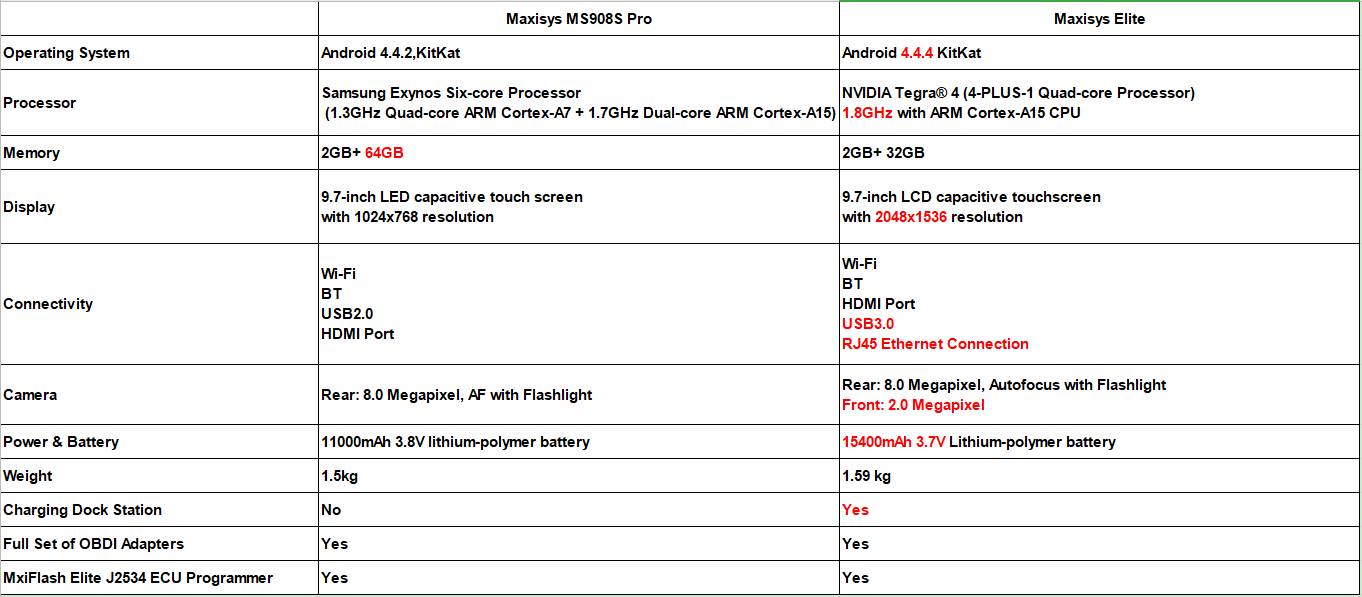
Difference between MS908SP and Maxisys Elite on Hardware:
Battery: The Autel Maxisys Elite features a powerful 15400 mAH 3.7v lithium battery, while the Autel MS908S Pro features an 11000 mAh 3.7v lithium polymer battery. Then Maxisys Elite has an excellent run time of more than MS908SP and up to 14 hours of continuous use.
Speed: If you want the fastest scanner on the market, then the Autel Maxisys Elite will be the best choice. With a fast operating system in the Android 4.4.4 Kitkat and 1.8 GHz processor, this is a very fast and accurate scan tool. It is faster than the MS908S Pro which has Android 4.4.2 and 1.7 GHz processor.
Capacity: Autel MS908SP supports a capacity 64GB while Maxisys elite 32GB only. If you consider a larger capacity diagnostic tool, then MS908SP is a better choice.
Unique advantages of Maxisys elite: Elite has powerful connectivity which supports USB 3.0 and RJ45 Ethernet Connection, additional, elite has a convenient charging dock.
Maxisys Elite VS MS908S Pro on Sofware
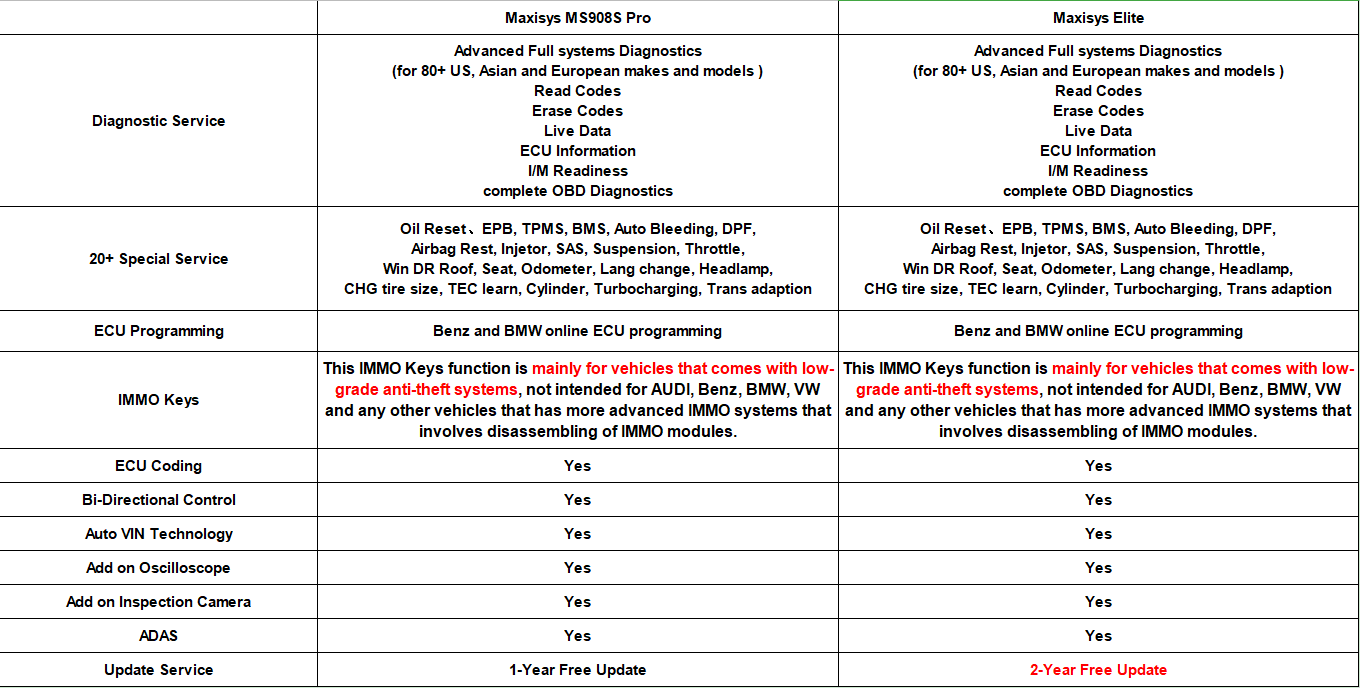
Difference between MS908SP and Maxisys Elite on software:
Functions: When it comes to functions, these two scanners offer the same functions such as ECU coding and programming, data logging, extensive OE-level diagnoses and service, smart Auto-VIN technology, tire pressure reset, SAS reset, and many other basic full OBD2 full functions, special, and advanced functions.
Vehicle coverage: Same time, The Autel MS908SP and Elite scan tools cover the same number of vehicles. Both of them have extensive vehicle coverage for more than 80 US domestic, European, and Asian vehicle makes and models.
Update & Warranty: Though they have total same functions, vehicle coverage, and 1-year warranty, In update service, Maxisys elite featured 2 years free update while MS908S pro just for one year.
After free update service, MS908S Pro or Elite costs 999 USD for 1-year update. Of course, you can still use the scanner when the free updates period expires but an update will cover the latest software and latest vehicle. View update service cost.
Maxisys Elite VS MS908S Pro on Price
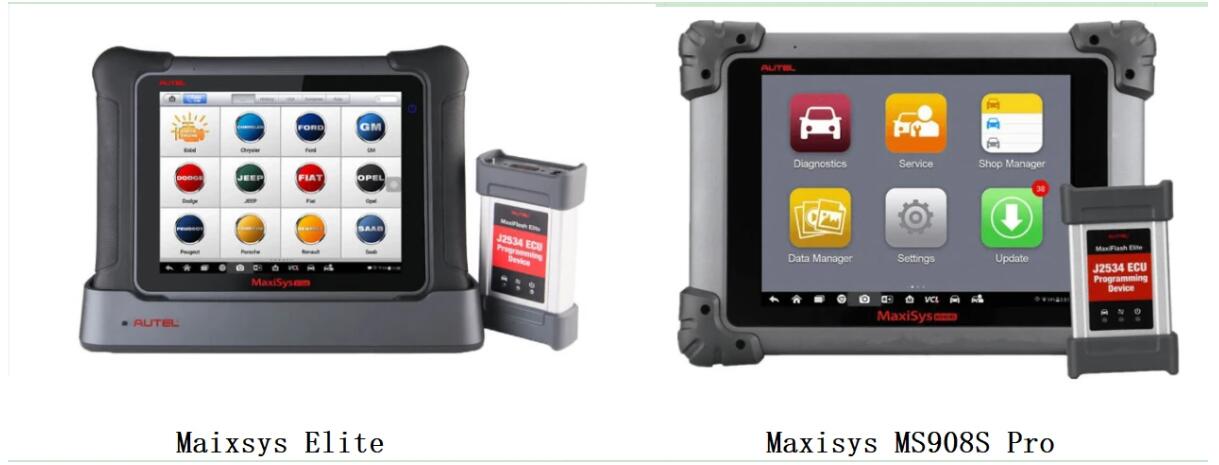
Usually in the market, Maxisys Elite sale $2899 and MS908S Pro sale $2399
If you want the best Autel scan tool and are not afraid to spend in
order to get it, then the Autel Maxisys Elite is the scanner to go for.
The MS908S Pro is a high-quality and professional-grade scan tool but it
still can’t be compared to the Maxisys Elite in terms of performance.
If you have limited budget, MS908SP is better for you.
Maxisys Elite and MS908S Pro, Which is better?
In one word, Though Maxisys Elite and MS908S pro have the same diagnostic functions and vehicle coverage, Autel Maxisys Elite is better than MS908SP in performance and update service.
If you have enough budget and want the best Autel Maxisys Scanner then don’t miss the Maxisys Elite. If you have a limited budget and looking for a high-quality and professional-grade Autel Maxisys scan tool, MS908S Pro is better for you.
Fixed! Chevrolet Lumina with loss of power on hills
Car model and year: 97 3.1 Lumina has 90K
Symptom:
a bit of a very slow coolant loss, and the pump was found leaking. Replacing that, about a month ago, it started having a loss of power between 20-40 mph. I took the car and found misfire codes on cylinders 2, 4, 5, and 6.
What I did:
I cleaned the MAS, replaced the spark plugs and wires, checked all the coil-packs with a spark tester (they checked out with strong spark), and checked the fuel pressure at the fuel tube that feeds the injectors . With that done and the problem persisting (especially when the car warmed up to operating temp), I had Cottman transmission (very reputable guys at this local shop) and they checked it out and found the same engine codes, but stated the transmission was working fine. During the next few weeks, another noted very slow coolant leak was detected without anything leaving the engine. During this time, possibly unrelated, I had problem starting the car and found the battery had developed a bad cell, but the alternator checked out, so I replaced the battery. Anyway, knowing the 3.1’s storied issue with the complicated factory head gaskets leaking coolant, I took the large task and replaced the head gaskets and had new valves and seats installed in the heads. it is much better, but still noted she felt there was still a lack of power on the hills.
Chevrolet Lumina scanner to use and test results:
Foxwell NT301scanner: not idea
I did get a Foxwell NT301 and saved some running data.
Here’s an example of one of the “printable” moments that the Foxwell recorded, there are well over 50 pages:
Calculated Load Value(%)14.9
Engine Coolant Temperature(øC)93
Short Term Fuel Trim -Bank 1(%)-6.3
Long Term Fuel Trim – Bank 1(%)-2.3
Intake Manifold Absolute Pressure(kPa)71.0
Engine RPM(rpm) 1893
Vehicle Speed Sensor(km/h)20
Ignition Timing Advanece for #1 Cylinder(ø)-1.5 Intake Air Temperature(øC)51
Air Flow Rate from Mass Air Flow Sensor(g/s)36.42 Absolute Throttle Position(%)43.9
Location of Oxygen SensorsB1S12–B2S—-
Oxygen Sensor Output Voltage Bank 1-Sensor 1(V)0.045 Short Term Fuel Trim Bank 1-Sensor 1(%)-3.9
Oxygen Sensor Output Voltage Bank 1-Sensor 2(V)0.105 Short Term Fuel Trim Bank 1-Sensor 2(%)N/A
OBD requirements to which vehicle is designedOBDII
Just test drove her again and got the error code:
PO102
Mass of Volume Air Flow A
Circuit Low
I replaced the MAF a few days ago. So I remeoved the new plastic one
and replaced it with the original aluminum one (that’s clean as a
whistle) and there was no change in the error code. Plus, I then tested
it with my multi-meter, here are the results:
1) With the harness disconnected and the engine/ignition off:
All three wires (red, black and yellow) ohm-ed out as ground.
2) With the key in the ignition and it turned to run position without the engine on:
The power wire (red) had almost 13 volts, the ground (black) wire was grounded, and the signal wire had about 6 volts.
3) With the engine running and the harness attached:
I tested the Hertz with my TEST BENCH set to 20 Hertz and the signal
wire (yellow) had a fairly consistent 2.14 hertz at idle (engine warm)
and when the engine revved it smoothly went to just above 14 hertz and
then evenly went back down to 2.14 when the idle was slowly released.
I ran the car with my Foxwell attached and the Foxwell has a (g/s) reading for the MAF during the events in real time. It seems it was registering 4-5 during idle and was at the 40-50 range when it was bogging down, but when it cleared and accelerated as expected, it was well into the high 60s and into the 70s.
With GM Tech 2
Finished (though I had to go to a shop with a Tech 2 and basically rent it with the mechanic).
Everything is factory spec, and it idles and revs without issue. No trouble codes. Everything is within spec. when we looked over all the info in his Tech 2 readings.
When driving (though markedly better and gets up to highway speed great), still it seems the engine, as it is accelerating: feels that it either adjusts the fuel/spark a bit, or the transmission shifts prematurely into a higher gear or something (that’s the only way I can describe it). It’s weird to feel the car do something without driver input. Whatever it is is keeps the car from continuing its acceleration for a few seconds. If I give it throttle during the event, it downshifts and accelerates great through the issue. If I don’t alter the accelerator, and keep it steady during the event, it waits a few seconds and then shifts to overdrive and feels normal.
Since I changed the fluid and filter when I first was alerted of the issue by my daughter during my maintenance work, and the old fluid was discolored (aged) and there was no metal dust or filings on the magnet, I’m wondering if I just need to allow her to drive it and change the fluid again in a few days and see if it flushes more of the old fluid that was trapped inside the torque converter?
PROBLEM SOLVED
So my friend has some awesome equipment to test Hz and other sensor
feedback and we looked at the Knock Sensor and the O2 Sensors (much more
sensitive than mine as well as had the exact ranges of signal that
should be expected). The Knock Sensor and the O2 Sensors both looked
slightly out of spec, enough to do a test drive with first the Knock
Sensor disconnected and then a drive with both the Knock Sensor as well
as the upstream O2 Sensor disconnected.
With the Knock Sensor disconnected the drag or delay in acceleration under load was gone, though it wasn’t completely smooth. With both disconnected, it drove really well and there was no drag or delay or alteration of power during driving. I replaced both the Knock Sensor as well as the upstream O2 Sensor and tested the car again. It drives as it should.
So, in the end, the car had these issues:
1) the #1 cylinder had a head gasket leak, fixed with head gaskets replaced
2) the MAF sensor was sending inaccurate info and had a damaged wire, replaced
3) the vacuum Transmission Modulator was broken, replaced
4) the upstream O2 Sensor was not within spec, replaced
5) the Knock Sensor was sending wildly inaccurate info, replaced
Interestingly, only item #2 above was determined by the PCM to be in error and would throw a Service Engine Soon light or throw a code, the PCM was silent on the other errors. I guess a ’97 GM PCM was not very sophisticated.
Hope it helps!
XTool X100Pad Elite and XC501 Program Audi 2014 A4L Key
XTool X100Pad Elite (X100 Pad3) and XTool XC501 program Audi 2014 A4L new key step by step.

Enter into Xtool X100Pad Elite main menu, click “diagnosis”, Choose “Audi” and Agree,
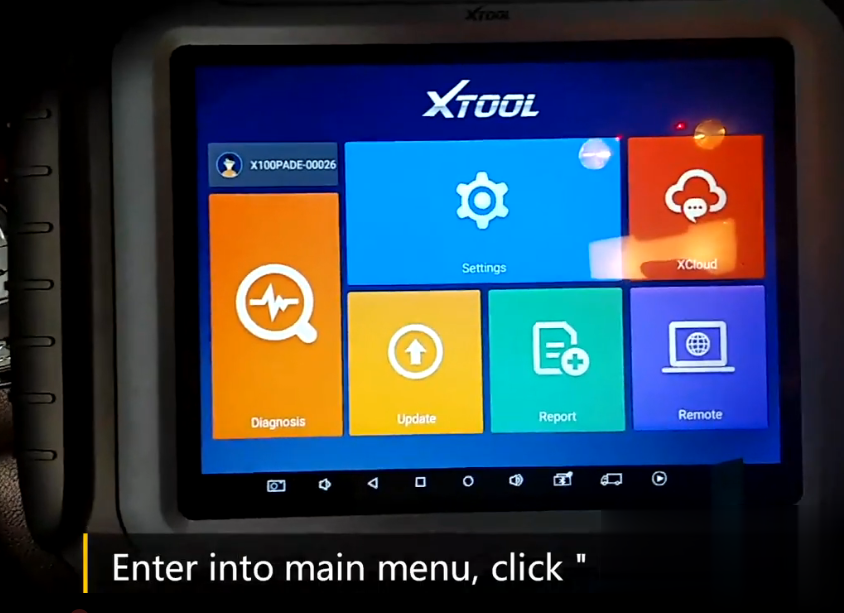
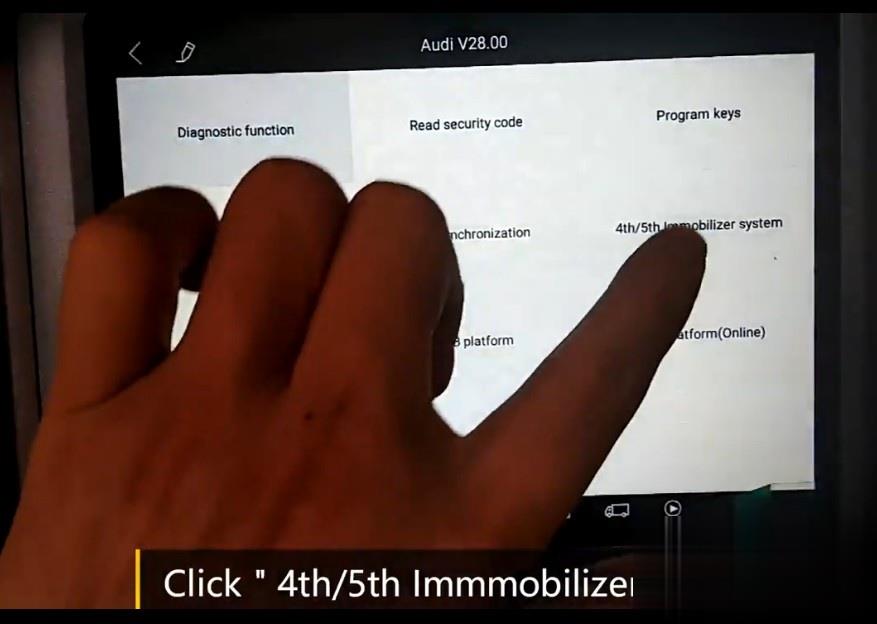
Click 4th/5th Immobilizer system
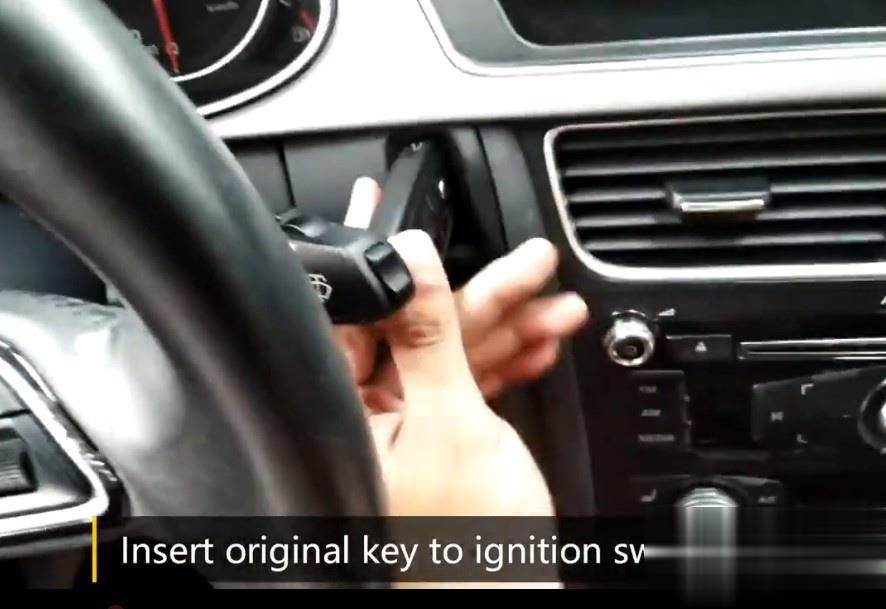
Insert Original Key to ignition switch,Click OK
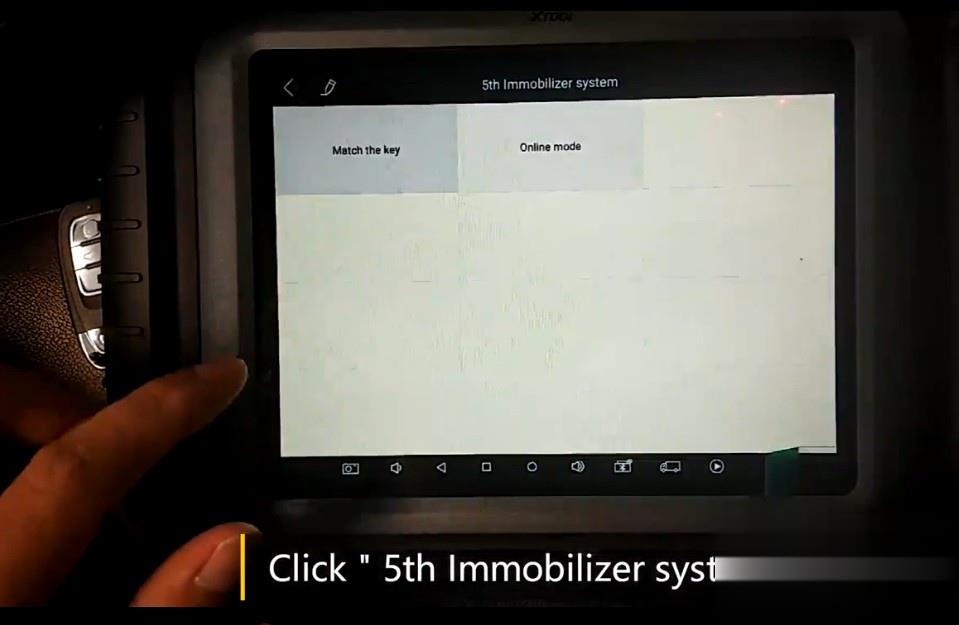
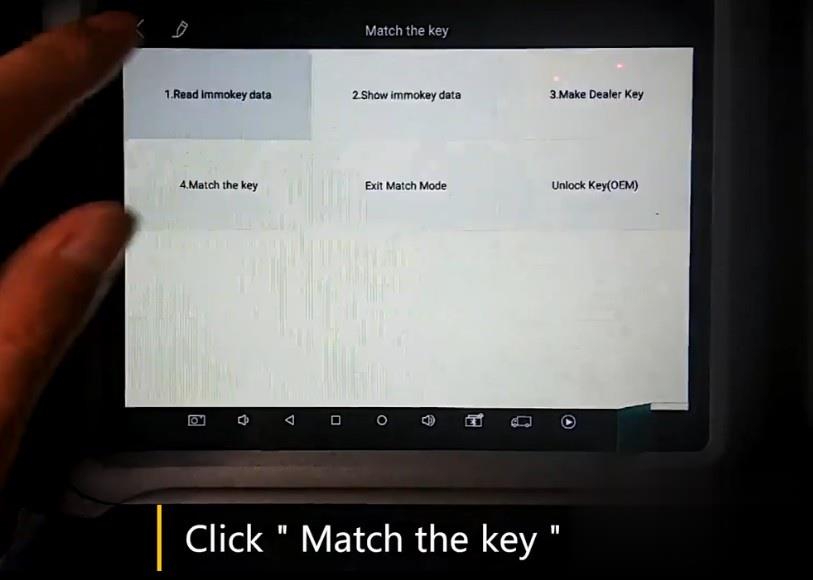
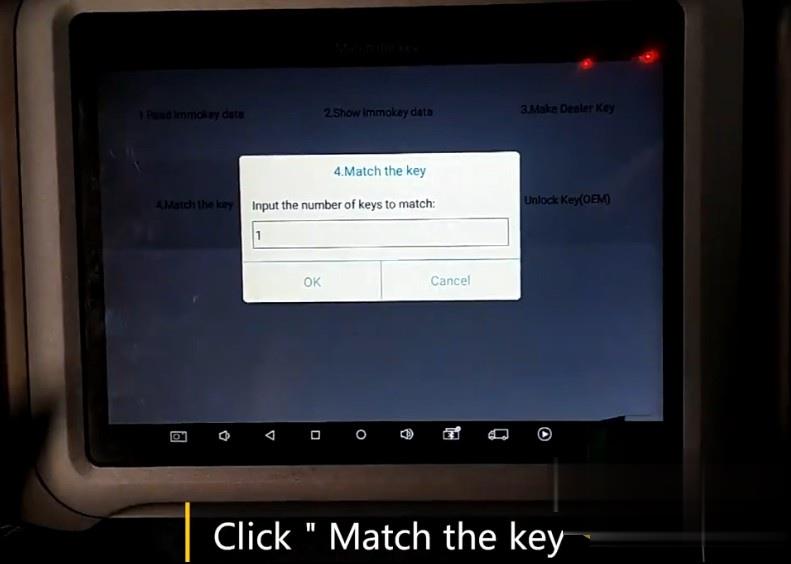
Click “5th Immobilizer system” and Click Match the key
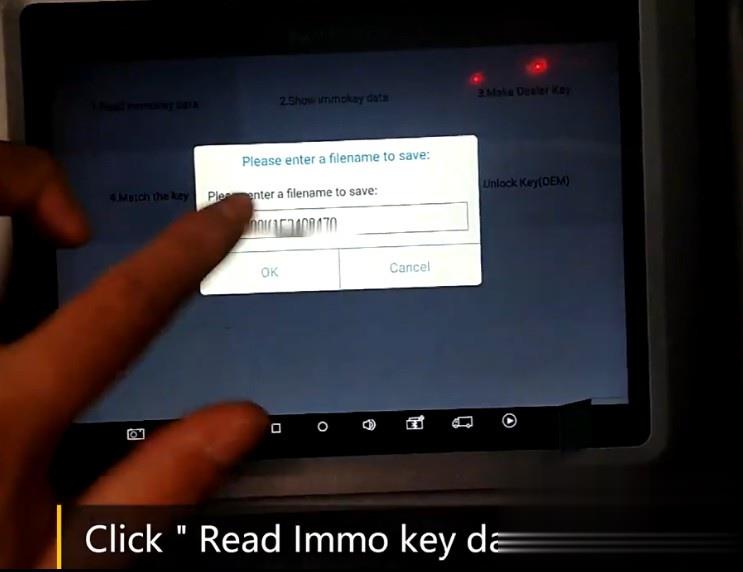
Click Read Immo Key Data
Enter Filename, and Click OK, and then read immo key data completed. Click OK.
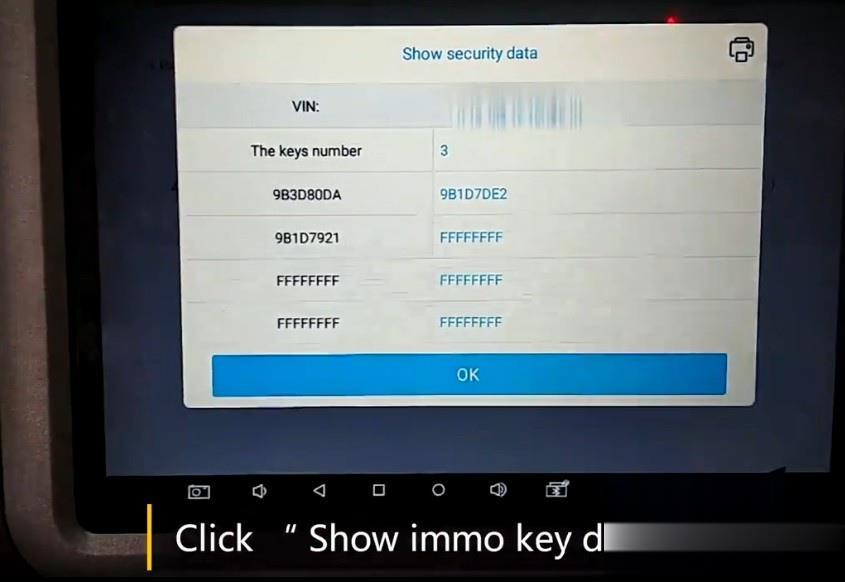
Click “Show Immo Data” , Data including VIN number,keys number are displayed,Click OK.
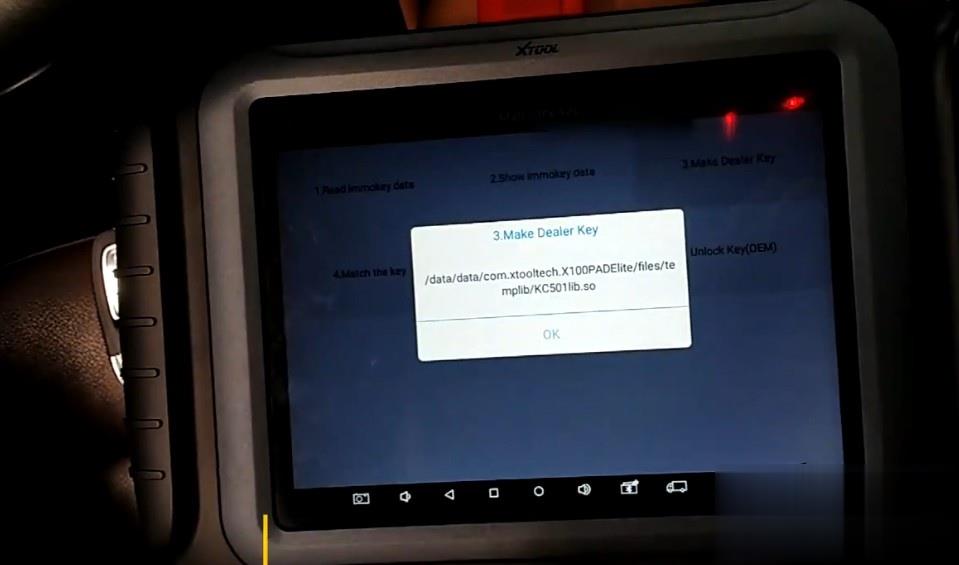
Click Make Dealer Key
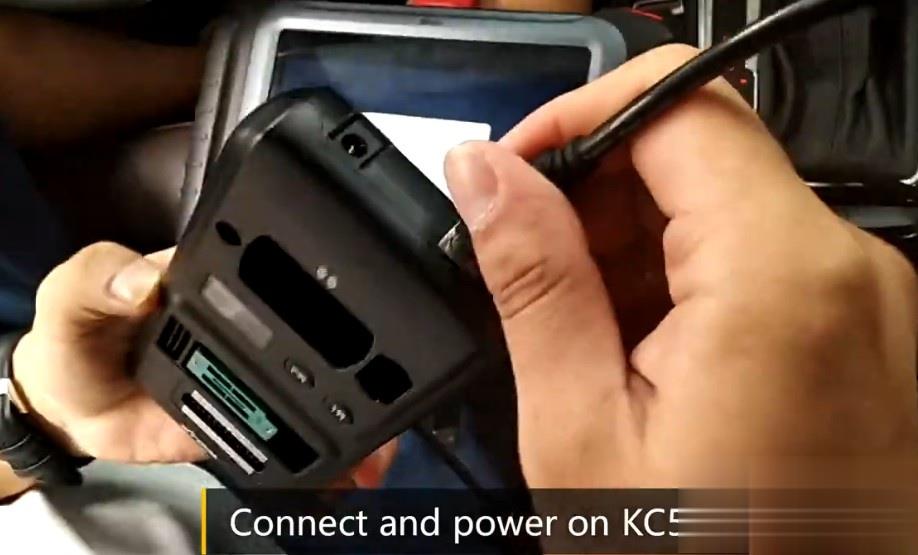
Connect and Power on Xtool KC501
Click OK and Yes to blind then Click”Create A4/A5/Q5 key”
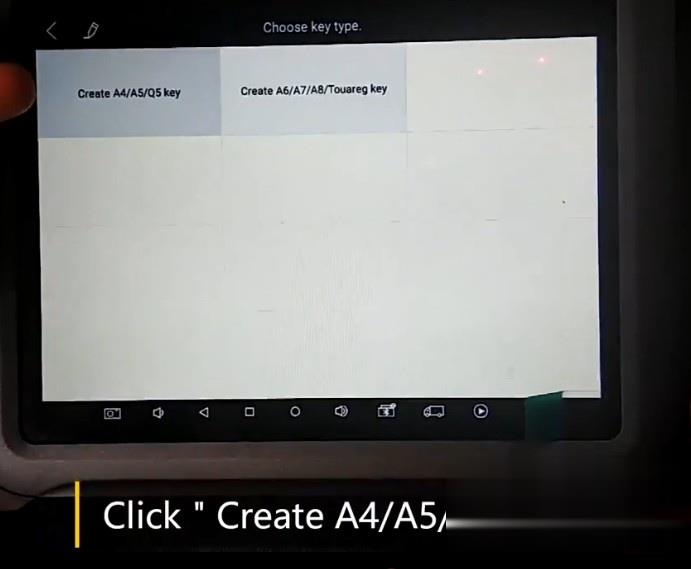
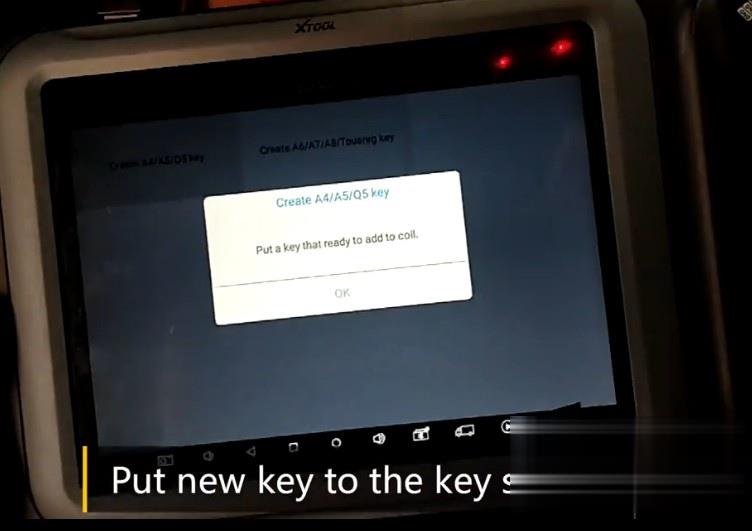
Put the new key to key slot of KC501
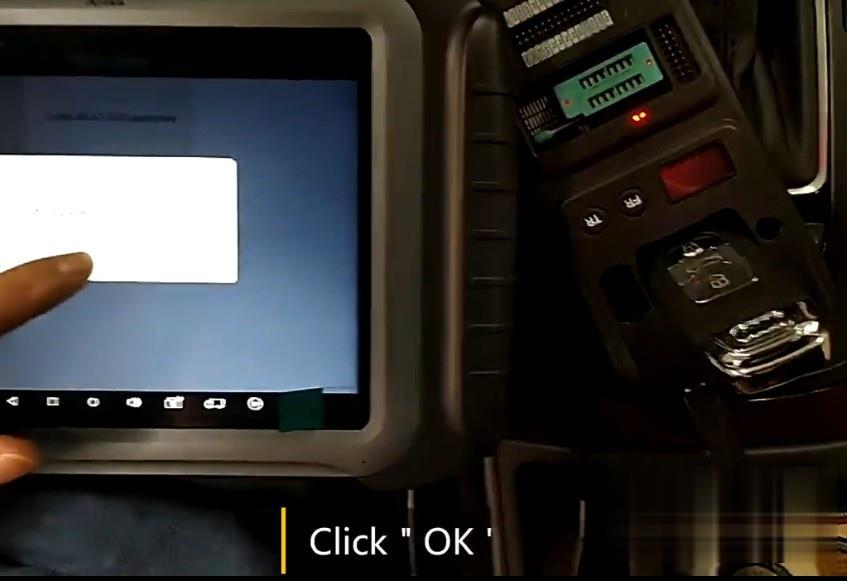
Click OK
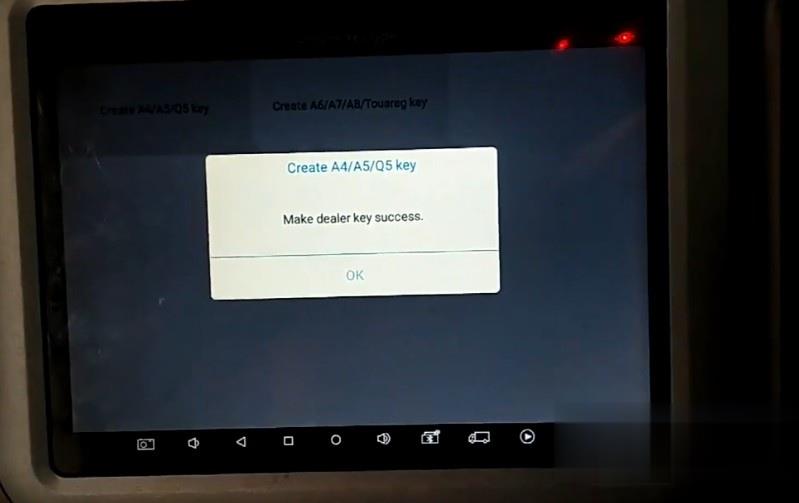
Make dealer key success,Click OK
XTool-X100Pad-Elite-and-XC501-Program-Audi-2014-A4L-Key-14
Click Match the key,enter the total key numbers 2 (original key + new key), Click OK
The Dashboard Show 1/2 Now
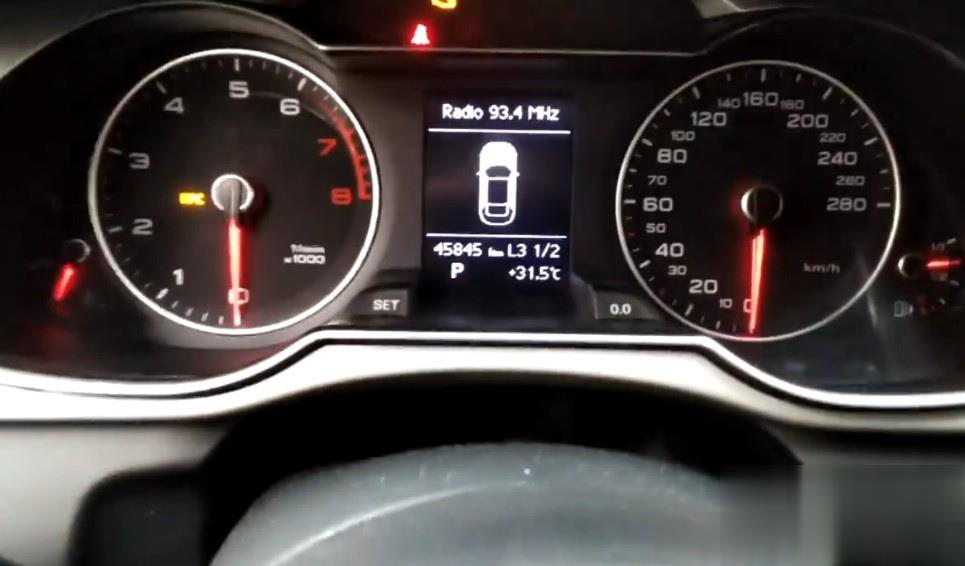
Remove original key from ignition,Insert the new key to ignition,the dashboard show 2/2 now

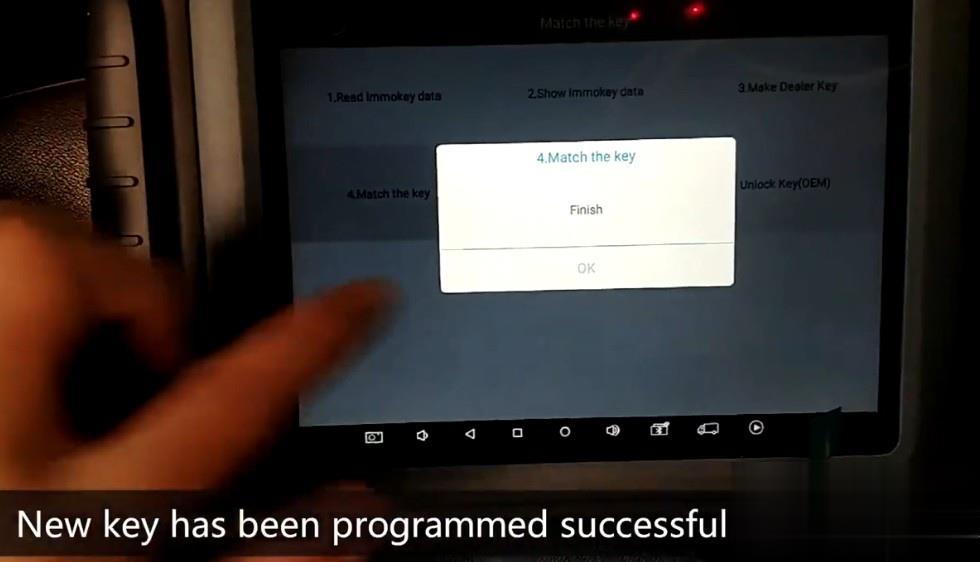
The new key has been programmed successfully
How to Solve OBD2 Port Not Communicating with Tech 2 Scanner
This post collected the problem “OBD2 Port Not Communicating with Vetronix Tech 2 Scanner” from the user and offered the way to deal with. Hope it may help you when you meet the same
I recently purchased a clone GM Tech2 scanner to access the diagnostics in my 2006 Hummer H2. The scanner is operational and can scan all protocols but can not link to any of them. There are no driveability issues. I performed troubleshooting by doing the following:
Verified that the Power Control Module (PCM) and Data Link Connector (DLC) fuses were okay.
Tested DLC pins 4 (chassis ground) and 5 (PCM ground). The voltage was less than 0.1 which led me to believe low resistance.
Performed a volt reference check on DLC pin 2 (serial data) to determine
if it was 5 volts and actual voltage was between 1 and 2.
Tested DLC pins 4 and 16 (battery) and the voltage was 12.58.
Checked the purple, black, black/white and orange wires on the back of
the DLC for integrity and did not find any issues with fraying or
looseness.
I am not sure what to think, whether the issue is with the PCM or wiring. I am trying to locate a wiring diagram for the PCM and DLC which will give me a better understanding of the wire mapping. I know the PCM has two connectors and I probably should see if there is continuity in the purple wire (Pin 2) and its termination in one or the other connector.
Solution:
“DLC” is the Datalink connector (the connector that pushes into the vehicle) so “DLC-2″ is Data Link Connector pin 2.
“D” is the 26-Way D-Type Connector that screws into your Tech2, “D-4″ is 26-Way D-Type pin 4.
So if you look at the ends of the cable connectors, the pins are numbered as per my sketch.
So detach your TECH2’s cable and check the following:
DLC-2 connects to D-4
DLC-4 connects to both D-8 and D-9
DLC-5 connects to D-2
DLC-16 connects to both D-17 and D-18
These 4 wires are the only important ones, the rest you can ignore, infact DLC-2 to D-4 is the key one, I suspect everything else is OK.
Your TECH2 should have come with a 12V Power Supply that plugs-in just to the right of the 26-Way D-Type, its a standard 12V jack. If you don’t have a PSU one from a PC monitor, just check its 12V.
Connect scope probe tip to DLC-2 and ground clip to either DLC-4 or DLC-5, set the scope to DC, 1V/Division and 200uS/Division. If you can set the scope to “free run” or “continuous” just to prove there is activity then set it to “DC Triggered” with a trigger level of around +1V to +2V. On the TECH2 select the function I mentioned before (even if your vehicle doesn’t have AS) and you should see a signal the moment you hit the key.
If the signal looks similar to the one I posted, then its safe to assume your TECH2 is working OK.
When you say “The OBD2 Scanner
is operational and can scan all protocols but cannot link to any of
them” do you get a communications error? If so make sure you have
selected the correct “Model Year” not the year the truck was 1st bought
e.g. my model year is 2005 but was bought in 2006. I noticed that I get
the same issue when the wrong year is selected.
loading..
2002 GMC Sierra Scan Tool or Diagnostic Tool you use – pros and cons
Car model and year: 2002 GMC Sierra 1500
Purpose: to pull codes
Scan Tool or Diagnostic Tool to use – pros and cons
1. GM Tech2 pros and cons
To do work on gm stuff I have knock off Tech2. I like it.
2. My OBD Link MX+ or Konnwei Bluetooth devices with the usual Dash Command, Torque Pro, OBD Link and Motor Data apps work for me for troubleshooting.
For us LS engine swap people that don’t like to pay the HP Tuners folks money to license a new operating system, there are now free alternatives. “Tuner Pro RT” software allows the free editing of a General Motors PCM operating system to get it to work in a swapped vehicle. Then we use “LS Droid” software with my MX+ device to actually write the changed Tuner Pro operating system to the PCM which completely avoids spending money on HP Tuners.
3.
For a long time I have gotten by with a simple scanner. These days with
the Bluetooth devices and the torque app…that is even easier for basic
stuff. Back in 2011 I picked up an Innova 3150 which had the ability to
read ABS and SRS system faults. It was about $150 then. Current ad for
this older tool shows $220…not sure why xxxx
I have considered a clone Tech2 and or the MDI device I have seen
mentioned. My main concern other than the $300 cost…which is not bad for
what it does….was that I did not want to somehow brick my ECU or any
other module either due to the clone tool or my lack of knowledge of
using one of these more sophisticated diagnostic tools.
I decided to get one that would perform the ABS bleed, mainly because I like to flush the brake fluid ever few years. What I ran across for the least $$ to fit what I was looking for is the Foxwell NT630 Plus. Listing made an offer to another listing but they would not budge. (why do they show make an offer if they only will drop a dollar?!). The one Currently my plan is to sell the Innova locally and try and recoup most of the cost of the new tool.
4. My 2001 GMC truck has a problem with the red brake warning light and the yellow ABS lights randomly coming on at the same time. I wanted to find out what code was being set. I quickly learned the local auto parts stores couldn’t read ABS codes. I also learned that the repair shops in my area charged $35-$59 just to use their scanner to check for ABS codes. I thought that was too much for a 5 minute scan so I decided to buy a scan tool that would read ABS and SRS codes as well as OBDII codes. Over the course of several weeks I have purchased three scan tools and returned each one of them for a refund for reasons I will describe below What I wanted a scan tool to do.
I initially set out to find a scan tool that would read ABS, SRS and OBDII codes on all my vehicles, a 1999 S10 Blazer, a 2001 GMC Sierra, a 2012 Equinox and my daughters. 2009 Camry. I wanted to spend no more than $125. I know that sounds like a lot to hope for but I figured I might be able to do it.
Then I confirmed Tech2 is able to do ABS Brake Automated Bleed & Pressure Bleed for Chevy & GMC. Just google ” GMC Sierra 2002 Tech2″ and you will see a Youtube video on how to do.
5.
Question: Will this gm tech2 work with my 2012 GMC Sierra 1500. Will I
be able to calibrate the BPP sensor out of the box? Thanks!
Reply:
If you scroll down further it lists it as going to 2013. I bought one
like this and it has been great to diag and repair everything. Too bad
it doesn’t work on my camaro(MDI).
Could be, but there was an updated 32MB card that supported up to ’13.
Or get a Jbox or an MDI2 as it can do anything a tech 2 can and much more. I can go into much more detail if needed but don’t buy a tech 2 it’s outdated and obsolete as of 2013 at best. I have 4 scan tools ranging from 300-5000$ and you can easily spend 500 or less and do anything I can.
It’s called the open port 2.0. It is compatible with GM’s programming
website called SPS. That tells me it’s a go for the tech 2 win program
which is a laptop version of the handheld tech 2. It also would work
with GDS2 which is the current diag tool via laptop for GM. Then you can
lease the use of the software as needed.
https://www.acdelcotds.com/acdelco/action/subscribehome This is The site
to lease the programs. It may not make since for some people but if you
are devoted to “doing it yourself” it’s the only way, end of story. You
will use other software to diag the problem and then slide over to gm’s
stuff if needed but this will give you the widest range of
functionality.